I used all sorts of different tools within my editing stages.
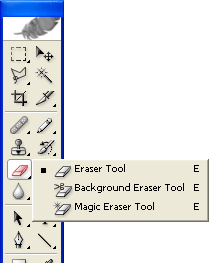 The eraser tool: I used this to rub out all of the background on my original image. I took away the whole of the yellow-y background and used it to cut around my model.
 The clone stamp: I used this to hide the bra strap on my model. It clones parts of the other picture so that you can make it look more realistic.
 The brush tool: I used this to add some colour to my model's eyes. I added a little blue to her eyes to make them stand out. I also used this to be able to lighten my model's hair. I turned the opacity down and went over her hair with a colour that is a little lighter than her hair was originally.
 The text tool: I used this to add all of the text onto my products. You can change the font and colour very easily and rotate/warp it to make it completely your own too!
 The shape tool: I used this to create the splash on my magazine front cover.
 The layers tab is very important within photoshop. The use of layers helps you move certain things above and under other things. You create a new layer as soon as you do something different.
 Blogger is the website that I used to post all of my work on. I had to work out how to publish and create posts and get them all in order. I learnt how to insert different types of media such as images, Prezis, and videos etc.
 I used Prezi to present some of my work. I found it hard to use at first but after a couple of tries I figured it out. I like presenting work in it as it looks interesting and keeps people reading.
I used hardware such as phone cables and USB sticks to store and move all of my files onto and off the different computers that I worked on. They are effective because they are small, easy to transport and carry around with me. My USB stick is a 32GB one which is ideal because I had a lot of work to store on it. The negatives are that because it is small it is easy to lose. Also you have to eject them from the computer otherwise you can corrupt the files on them.
I worked on a PC and a Mac when producing my magazine, this is a negative point because I had a font that wasn't available for use on a PC which meant I had to get it from another source. This was bad because if effected the quality of the writing on my product which I didn't like.
I used my iPad to video my model within my research. I thought this was good and easy to use and upload to YouTube. It worked well and went smoothly.
I used a Canon 70D to take the photographs that I used on my magazine. This was a great camera to use as it let me change all of the settings and get an amazing quality picture for my magazine.
For example: This is how I used the brush tool within the editing stage of my magazine.

I wanted to make my model's eyes look more eye-catching and defined. I watched a tutorial on YouTube which showed me the perfect method.
1. I used the zoom tool to zoom in close to her eyes.
2. I then got the colour box and used the Colour Libraries to chose a nice coloured blue.
3. I didn't want her eyes to be so blue that it looked fake so I went up to the top bar and turned the opacity down.
4. I then used the paint brush tool with the feathered edge, which I set to just the right size to fit around her eye and clicked a few times so that there was a blue tint on her eye.
5. I then went over the lighter bit with the Dodge tool to bring out the highlights in her eye.
6. I then clicked on the burn tool which brings out the lowlights in her eye and makes her eyes look like they aren't fake.
7. I then thought of an idea of created a 'false eyelash look' with the paint brush tool. I zoomed in even more with the zoom tool and made the brush size the smallest it would go (1px). I changed the colour to black with the colour picker and started to draw individual lines like eyelashes onto her eye.
8. I carried on to the point where I thought it looked full enough.
9. Then I zoomed out and saw that the eyelashes look really hard and fake, so I zoomed back in and selected the rubber tool. I turned the opacity down and went over the ends of the lashes that I has just drawn to feather the lashes out.
10. I then did the same to the bottom lashes and then repeated the steps with the other eye.

No comments:
Post a Comment