Friday, 11 April 2014
Q7. Looking back at your preliminary task, what do you feel you have learnt in the progression from it to the full product?
I have learnt a lot from doing my music magazine. I have developed my skills in Photoshop, Prezi, Blogger, GoAnimante, and Slideshare. I have learnt the ins and outs of each of the software, I have learnt a lot more than I did when I did my preliminary task. I feel like my products convey conventions a lot stronger in my music magazine than my college magazine because they have more depth and feel fuller than my college one. My college magazine seem flat and boring in comparison to my music magazine. My music magazine has more of a professional and 'real' feel to it due to the conventions that I have included.
I have learnt how to make my product feel like the real thing using research of different existing magazines. I have modeled my products on one specific issue of a magazine which I thought was really helpful in making my magazine look professional.
I have learnt how to attract a certain audience through the use of features in my magazine. I now know how changing colours, fonts, and artists etc will change who will read my magazine so that I can sculpt it so that the person that I want to will read it.

Q6. What have you learnt about technologies from the process of constructing this product?
I used Photoshop to do some of the editing to my products. Photoshop is a top of the range piece of software that lets you tweak and edit photographs and things with immense precision. I used photoshop because it gives very good detail and made my magazine look more professional.
I used all sorts of different tools within my editing stages.
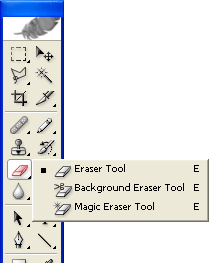 The eraser tool: I used this to rub out all of the background on my original image. I took away the whole of the yellow-y background and used it to cut around my model.
 The clone stamp: I used this to hide the bra strap on my model. It clones parts of the other picture so that you can make it look more realistic.
 The brush tool: I used this to add some colour to my model's eyes. I added a little blue to her eyes to make them stand out. I also used this to be able to lighten my model's hair. I turned the opacity down and went over her hair with a colour that is a little lighter than her hair was originally.
 The text tool: I used this to add all of the text onto my products. You can change the font and colour very easily and rotate/warp it to make it completely your own too!
 The shape tool: I used this to create the splash on my magazine front cover.
 The layers tab is very important within photoshop. The use of layers helps you move certain things above and under other things. You create a new layer as soon as you do something different.
 Blogger is the website that I used to post all of my work on. I had to work out how to publish and create posts and get them all in order. I learnt how to insert different types of media such as images, Prezis, and videos etc.
 I used Prezi to present some of my work. I found it hard to use at first but after a couple of tries I figured it out. I like presenting work in it as it looks interesting and keeps people reading.
I used hardware such as phone cables and USB sticks to store and move all of my files onto and off the different computers that I worked on. They are effective because they are small, easy to transport and carry around with me. My USB stick is a 32GB one which is ideal because I had a lot of work to store on it. The negatives are that because it is small it is easy to lose. Also you have to eject them from the computer otherwise you can corrupt the files on them.
I worked on a PC and a Mac when producing my magazine, this is a negative point because I had a font that wasn't available for use on a PC which meant I had to get it from another source. This was bad because if effected the quality of the writing on my product which I didn't like.
I used my iPad to video my model within my research. I thought this was good and easy to use and upload to YouTube. It worked well and went smoothly.
I used a Canon 70D to take the photographs that I used on my magazine. This was a great camera to use as it let me change all of the settings and get an amazing quality picture for my magazine.
For example: This is how I used the brush tool within the editing stage of my magazine.

I used all sorts of different tools within my editing stages.
The eraser tool: I used this to rub out all of the background on my original image. I took away the whole of the yellow-y background and used it to cut around my model.The clone stamp: I used this to hide the bra strap on my model. It clones parts of the other picture so that you can make it look more realistic.The brush tool: I used this to add some colour to my model's eyes. I added a little blue to her eyes to make them stand out. I also used this to be able to lighten my model's hair. I turned the opacity down and went over her hair with a colour that is a little lighter than her hair was originally.The text tool: I used this to add all of the text onto my products. You can change the font and colour very easily and rotate/warp it to make it completely your own too!The shape tool: I used this to create the splash on my magazine front cover.The layers tab is very important within photoshop. The use of layers helps you move certain things above and under other things. You create a new layer as soon as you do something different.Blogger is the website that I used to post all of my work on. I had to work out how to publish and create posts and get them all in order. I learnt how to insert different types of media such as images, Prezis, and videos etc.I used Prezi to present some of my work. I found it hard to use at first but after a couple of tries I figured it out. I like presenting work in it as it looks interesting and keeps people reading.I used hardware such as phone cables and USB sticks to store and move all of my files onto and off the different computers that I worked on. They are effective because they are small, easy to transport and carry around with me. My USB stick is a 32GB one which is ideal because I had a lot of work to store on it. The negatives are that because it is small it is easy to lose. Also you have to eject them from the computer otherwise you can corrupt the files on them.
I worked on a PC and a Mac when producing my magazine, this is a negative point because I had a font that wasn't available for use on a PC which meant I had to get it from another source. This was bad because if effected the quality of the writing on my product which I didn't like.
I used my iPad to video my model within my research. I thought this was good and easy to use and upload to YouTube. It worked well and went smoothly.
I used a Canon 70D to take the photographs that I used on my magazine. This was a great camera to use as it let me change all of the settings and get an amazing quality picture for my magazine.
For example: This is how I used the brush tool within the editing stage of my magazine.
I wanted to make my model's eyes look more eye-catching and defined. I watched a tutorial on YouTube which showed me the perfect method.
1. I used the zoom tool to zoom in close to her eyes.
2. I then got the colour box and used the Colour Libraries to chose a nice coloured blue.
3. I didn't want her eyes to be so blue that it looked fake so I went up to the top bar and turned the opacity down.
4. I then used the paint brush tool with the feathered edge, which I set to just the right size to fit around her eye and clicked a few times so that there was a blue tint on her eye.
5. I then went over the lighter bit with the Dodge tool to bring out the highlights in her eye.
6. I then clicked on the burn tool which brings out the lowlights in her eye and makes her eyes look like they aren't fake.
7. I then thought of an idea of created a 'false eyelash look' with the paint brush tool. I zoomed in even more with the zoom tool and made the brush size the smallest it would go (1px). I changed the colour to black with the colour picker and started to draw individual lines like eyelashes onto her eye.
8. I carried on to the point where I thought it looked full enough.
9. Then I zoomed out and saw that the eyelashes look really hard and fake, so I zoomed back in and selected the rubber tool. I turned the opacity down and went over the ends of the lashes that I has just drawn to feather the lashes out.
10. I then did the same to the bottom lashes and then repeated the steps with the other eye.
Thursday, 10 April 2014
Q4. Who would be the audience for your media product?
Before I made my products I had to think about who I would aim them at. To get some idea of how to design my products in order to get the maximum popularity, I looked at existing products and who their target audience is. I had to ensure that I got my target audience right in terms of conventions. This means that I had to consider how different target audiences will affect the different aspects of my design. For example gender would affect the colour scheme and the type style, for men, the colours would be darker and more toned down. The type style for men will be more rigid and sharp, appose to a females which would be vivid and vibrant colours and more flowy, curly type.

 I looked at Billboard's audience profile. I looked at who are the people that mostly read the magazine and what they are like. I took key information from this media pack and altered it a little so that it isn't exactly like Billboard's, this will ensure more of an audience for my magazine because it wouldn't be as much competition.
Within my research I looked at different media profiles and analyzed them in conjunction with how their magazines meet the needs of their target audiences. I looked at how they represented their genre and how they portray the artist on the front. I then created my own profile for my magazine. I had to think about how I could make it so that my reader profile showed how my magazine is aimed to girls around the age of 20. I made it so that it was pink and girly. I added text that stood out like the people in my target audience would have. I added a picture in the bottom right hand corner of the page. It is off two girls at a concert, I put this on because you can see that they are a pop concert because of the 'fan girl' clothes and face paint they are wearing. They are in shock and look like they're in awe of the artist they are seeing, this creates a very good profile look for the person who would read my magazine.
I asked some people what they thought of my magazine.
Toni Wilson, 16, from Hull said: Your magazine conveys the conventions of a magazine great. Your magazine is edgy, fresh and new. The colour scheme is great in connection with your target audience, the type face you have used really draws in the audience. I think your reader profile is very suited for the type of person that would buy your magazine. All in all great job.
Adam Brocklebank, 17, from Hull said: Although there's a lot of pink and things throughout your products I still think that I would go and buy this magazine. The girl on the front will definitey draw some male attention to your magazine. I like how new this magazine looks and how it is different. I think your reader profile is accurate with more females reading it rather than boys, but I do think boys will read it some times.
Within my research I looked at different media profiles and analyzed them
in conjunction with how their magazines meet the needs of their target
audiences. I looked at how they represented their genre and how they portray
the artist on the front. I then created my own profile for my magazine. I had
to think about how I could make it so that my reader profile showed how my
magazine is aimed to girls around the age of 20. I made it so that it was pink
and girly. I added text that stood out like the people in my target audience
would have. I added a picture in the bottom right hand corner of the page. It
is off two girls at a concert, I put this on because you can see that they are
a pop concert because of the 'fan girl' clothes and face paint they are
wearing. They are in shock and look like they're in awe of the artist they are seeing;
this creates a very good profile look for the person who would read my
magazine.
I had to also take into consideration the price. I had to think about if I aimed my magazine towards adults then I could price my magazine a little more expensive, but if I aimed it at younger people I would have to ensure it was a little cheaper so that more people could afford to buy it, I priced my magazine at £1.70 because I thought this was reasonably cheap and affordable.Within my research I looked at different media profiles and analyzed them in conjunction with how their magazines meet the needs of their target audiences. I looked at how they represented their genre and how they portray the artist on the front. I then created my own profile for my magazine. I had to think about how I could make it so that my reader profile showed how my magazine is aimed to girls around the age of 20. I made it so that it was pink and girly. I added text that stood out like the people in my target audience would have. I added a picture in the bottom right hand corner of the page. It is off two girls at a concert, I put this on because you can see that they are a pop concert because of the 'fan girl' clothes and face paint they are wearing. They are in shock and look like they're in awe of the artist they are seeing, this creates a very good profile look for the person who would read my magazine.
I asked some people what they thought of my magazine.
Toni Wilson, 16, from Hull said: Your magazine conveys the conventions of a magazine great. Your magazine is edgy, fresh and new. The colour scheme is great in connection with your target audience, the type face you have used really draws in the audience. I think your reader profile is very suited for the type of person that would buy your magazine. All in all great job.
Adam Brocklebank, 17, from Hull said: Although there's a lot of pink and things throughout your products I still think that I would go and buy this magazine. The girl on the front will definitey draw some male attention to your magazine. I like how new this magazine looks and how it is different. I think your reader profile is accurate with more females reading it rather than boys, but I do think boys will read it some times.
Q2. How does your media product represent particular social groups?
How does your media product represent particular s by nataliew-97 on GoAnimate
2 by nataliew-97 on GoAnimate
3 by nataliew-97 on GoAnimate


This is my magazine front cover compared to Billboard's magazine front cover. I have used the same style as this magazine because I felt that this magazine looked professional and real, so I thought that I would pick a few things to use from this magazine. I feel I have represented artist in the same way that Billboard have within their magazine. I think that they both have an attitude about them and they both know what they want and they're getting it. I feel people would look up to my artist in the same way that they would look up to Miley on this front cover.


This is my contents page in comparison to Billboard Magazine's contents page. I have used the same thing with the pictures at the top being in line and the main picture being at the right hand side. I like both of these because I feel they're both professional. Mine is a lot more simple than Billboard's which I don't think is a bad thing but I feel that I could have made it a little more busy to look more like this one. I think that it is what it is lacking.


This is my double page spread compared to Billboard's double page spread. I have modeled my double page spread on this one because I feel like I wanted my artist to be in the same light as Miley is in Billboard's. I feel like they both have the same attitude and body language within each of these magazines which I like, I like how I have used the idea of a pun with one word that is a different colour in it. I did this because I feel that it makes my double page spread more real and believable. I also like the little white box in the corner, I also think this makes my magazine feel more real and that it also makes a great competition and advertisement opportunity.
2 by nataliew-97 on GoAnimate
3 by nataliew-97 on GoAnimate
This is my magazine front cover compared to Billboard's magazine front cover. I have used the same style as this magazine because I felt that this magazine looked professional and real, so I thought that I would pick a few things to use from this magazine. I feel I have represented artist in the same way that Billboard have within their magazine. I think that they both have an attitude about them and they both know what they want and they're getting it. I feel people would look up to my artist in the same way that they would look up to Miley on this front cover.
This is my contents page in comparison to Billboard Magazine's contents page. I have used the same thing with the pictures at the top being in line and the main picture being at the right hand side. I like both of these because I feel they're both professional. Mine is a lot more simple than Billboard's which I don't think is a bad thing but I feel that I could have made it a little more busy to look more like this one. I think that it is what it is lacking.
This is my double page spread compared to Billboard's double page spread. I have modeled my double page spread on this one because I feel like I wanted my artist to be in the same light as Miley is in Billboard's. I feel like they both have the same attitude and body language within each of these magazines which I like, I like how I have used the idea of a pun with one word that is a different colour in it. I did this because I feel that it makes my double page spread more real and believable. I also like the little white box in the corner, I also think this makes my magazine feel more real and that it also makes a great competition and advertisement opportunity.
Tuesday, 1 April 2014
Step by Step.

The background on my image wasn't great and I decided that I wanted to change it on photoshop.
1. I carefully used the rubber tool to cut around the model and the floor making sure I didn't rub out anything that I needed.
2. I selected the gradient tool and opened the option box.
3. I selected two different tones of grey's to make it look like there was light from one side when I had taken the photo.
4. I drew a horizontal line across the screen and this created the gradient that I had intended.
5. I then had to drag the layer with the gradient on to the bottom of all of the other layers so that it acts as the background.

I didn't think the carpet-look looked very good on my double page spread and though that I would change the flooring to a more aesthetically pleasing one - laminate.
1. I cut out the floor from my image using the rubber too.
2. I looked up images of hard wood flooring on Google and came across this one.
3. I dragged in into my file and placed the layer under the other layers.
4. I then rotated, stretched and warped it so that it was positioned in a way that looked like it had always been there.
5. I then got the clone stamp and went over the remaining original background on the image.
6. It looks like I haven't even changed the floor!
Friday, 28 March 2014
Step by Step Front Cover.

2. Then I created a new white layer and put it under my picture layer, to act as the background when I rub out around my model.
3. Using the rubber tool I carefully rubbed out all of the background around my model so that you could see the layer behind her. I used the fill tool so make this a very grey-y pink because I didn't want a bright white background as it hurt your eyes.
4. I changed the rubber tool form a hard edge to a feathered edge to rub around her hair, this is to make it look more realistic when it is on the new background.
5. I then realised that you could see her bra strap on the photograph which I instantly disliked. I use the clone stamp tool to take a clone of the other parts of her arm and used this to cover up the strap.
6. I wanted her to look more dark and tanned, to do this I went onto, Layer - Adjustments - Curves. I then played around with the curves to see different colours and tones within my picture. I like this version so I clicked save!

I wanted to make my model's eyes look more eye-catching and defined. I watched a tutorial on YouTube which showed me the perfect method.
1. I used the zoom tool to zoom in close to her eyes.
2. I then got the colour box and used the Colour Libraries to chose a nice coloured blue.
3. I didn't want her eyes to be so blue that it looked fake so I went up to the top bar and turned the opacity down.
4. I then used the paint brush tool with the feathered edge, which I set to just the right size to fit around her eye and clicked a few times so that there was a blue tint on her eye.
5. I then went over the lighter bit with the Dodge tool to bring out the highlights in her eye.
6. I then clicked on the burn tool which brings out the lowlights in her eye and makes her eyes look like they aren't fake.
7. I then thought of an idea of created a 'false eyelash look' with the paint brush tool. I zoomed in even more with the zoom tool and made the brush size the smallest it would go (1px). I changed the colour to black with the colour picker and started to draw individual lines like eyelashes onto her eye.
8. I carried on to the point where I thought it looked full enough.
9. Then I zoomed out and saw that the eyelashes look really hard and fake, so I zoomed back in and selected the rubber tool. I turned the opacity down and went over the ends of the lashes that I has just drawn to feather the lashes out.
10. I then did the same to the bottom lashes and then repeated the steps with the other eye.
Thursday, 27 March 2014

Friday, 14 March 2014


Friday, 7 February 2014
AS Media Studies Foundation Portfolio Evaluation.
The evaluation should be seen as a creative task and the potential of the formal chosen should be exploited through the use of images, audio, video and links to online resources.
In the evaluation the following seven questions must be addressed:
- In what ways does your media product use, develop or challenge forms and conventions of real media products?
- How does your media product represent particular social groups?
- What kind of media institution might distribute your media product and why?
- Who would be the audience for your media product?
- How did you attract/address your audience?
- What have you learnt about technologies from the process of constructing this product?
- Looking back at your preliminary task, what do you feel you have learnt in the progression from it to the full product?
Friday, 24 January 2014

Thursday, 23 January 2014


Subscribe to:
Posts (Atom)